Garmin Face It™2.0.11
Publisher Description
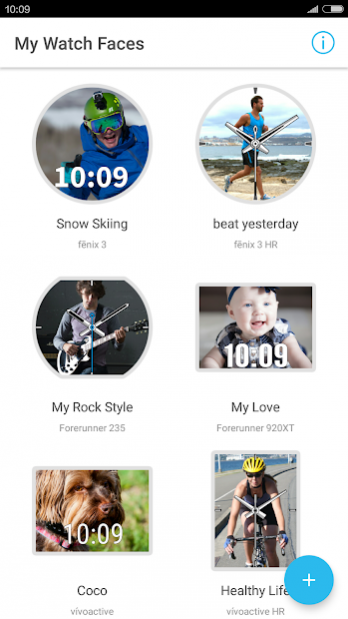
The Face It™ watch face app lets you customize your watch face with any photo from your mobile device. Download the app, choose an image from your photo library, add the time, and set it as your watch’s face. Whether it’s a scenic view from your last hike or a picture of your new puppy, the Face It app lets you add personality to your watch that’s uniquely you.
Available on the following Connect IQ™ compatible wearables: D2™ Bravo, D2 Bravo Titanium, epix™, fēnix® 3, fēnix 3 HR, quatix® 3, tactix® Bravo, Forerunner® 230, Forerunner 235, Forerunner 630, Forerunner 735XT, Forerunner 920XT, vívoactive® and vívoactive HR.
About Garmin Face It™
The company that develops Garmin Face It™ is Garmin. The latest version released by its developer is 2.0.11.
To install Garmin Face It™ on your Android device, just click the green Continue To App button above to start the installation process. The app is listed on our website since 2019-04-15 and was downloaded 27 times. We have already checked if the download link is safe, however for your own protection we recommend that you scan the downloaded app with your antivirus. Your antivirus may detect the Garmin Face It™ as malware as malware if the download link to com.garmin.android.apps.picasso is broken.
How to install Garmin Face It™ on your Android device:
- Click on the Continue To App button on our website. This will redirect you to Google Play.
- Once the Garmin Face It™ is shown in the Google Play listing of your Android device, you can start its download and installation. Tap on the Install button located below the search bar and to the right of the app icon.
- A pop-up window with the permissions required by Garmin Face It™ will be shown. Click on Accept to continue the process.
- Garmin Face It™ will be downloaded onto your device, displaying a progress. Once the download completes, the installation will start and you'll get a notification after the installation is finished.
Program Details
System requirements
Download information
Pricing
Version History
version 2.0.11
posted on 2019-04-15
Fixed crash issue
version 2.0.5
posted on 2017-10-12
1. Vivoactive 3 is now supported
2. Fixed general issues and bugs within the app
version 1.2.0
posted on 2016-12-09
1. Introduced 2 new templates and a new field: Distance,2. Pictures are now optimized for better presentation on device,3. Now you will see a launch screen while opening app,4. Bug fixes, salability improved.,5. Improved user experience, animations play more smoothly now, and bounding box of digital clock is more well-fitting now
